
Interact Scratchpad 1.0.4
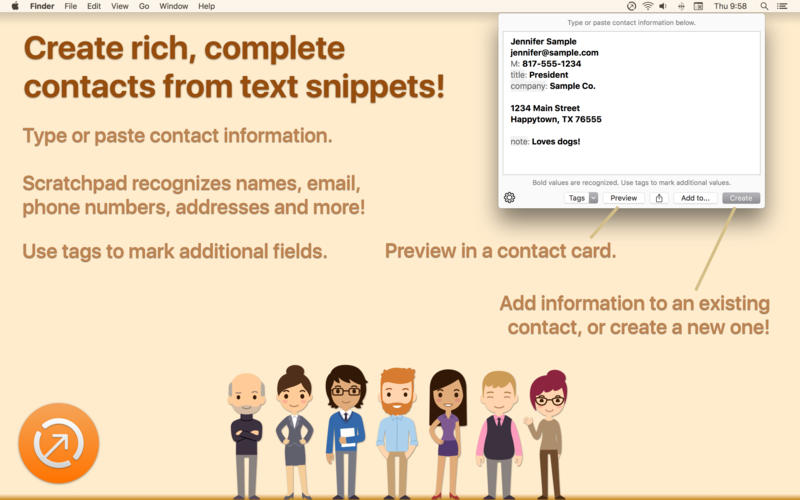
Interact Scratchpad is a tool to easily and quickly create rich, complete contact records from plain text. Copy text from email signatures, web pages, or any document, and let the Interact Scratchpad turn it into a contact for you! Interact sits in your menu bar, or is available in the "Share" contextual (right-click) menu on text selections. Simply type or paste in text snippets of contact information, and Interact will parse it in complete contact records. Interact automatically recognizes many common contact values, including names, email, addresses, phone numbers, company names. Insert simple tags to mark additional values. Recognized values appear in bold.
Interact works with your system contacts account, so no configuration is required.
Once text is entered, the resulting information, you can:
- Preview the resulting contact card.
- Create a new contact with the information.
- Add the values to an existing contact record.
- Export a vCard format version (without the need to add it to your Contacts).
WHAT’S NEW
Version 1.0.4:
- Fix for case where the "Create" button would seem to do nothing with certain texts and default contact accounts using Microsoft Exchange. If you use Exchange, you should find the Scratchpad works properly with all text examples now.
- Better error handling and feedback for possible data validation issues.
SCREENSHOTS
Frequently asked questions
How do I install the app?
Mount the image, drag the app into the "Applications" folder and launch it. If the system blocks the launch, allow it in "System Settings → Privacy & Security".
The app is damaged or won't launch
Reinstalling from a fresh image usually helps. Make sure your macOS version matches the one listed in the compatibility specs.
How do I update?
Download the new version from the site and install it over the current one — your settings will be preserved.
The download link doesn't work
Try a mirror or a download manager. For large files the browser often drops the connection.
How do I completely remove the app?
Use an uninstaller utility — it cleans up the service files that remain after moving the app to the trash.
VersionInteract Scratchpad 1.0.4
DeveloperAgile Tortoise
CompatibilityOS X 10.11 or later, 64-bit processor
LanguageEnglish
IncludesPre-K'ed



Information
Visitors in the group Guests cannot leave comments on this publication.
Choose a download source
Interact Scratchpad 1.0.4 · 8.69 MB