
MetaMovie 2.5.0
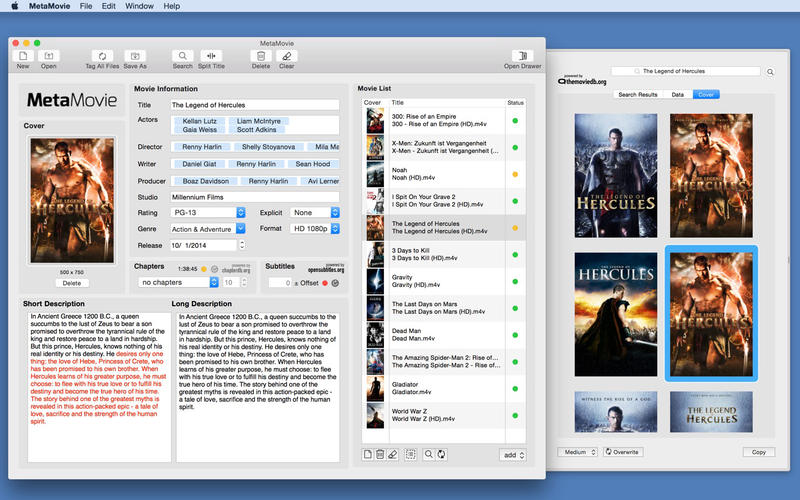
If you build you own movie library in iTunes, then you want it to look perfect. Imagine having all of the information about a movie at hand - actors, release date, directors, overview etc. And of course you want nice looking cover arts for your library. MetaMovie brings all this to your movies. Just drop your movie files on the movie list, start the search and then you need but one click to bring all the Information to your movies. The tagged movies look great in iTunes and on your Apple TV. MetaMovie supports the iTunes friendly .mp4 and .m4v file formats (MKV is not supported).
Version 2.5.0
- Neue Version der OpensubtitleAPI umgesetzt
- 4K Video Flag hinzugefügt
- Automatischen appleTV Import repariert
Frequently asked questions
How do I install the app?
Mount the image, drag the app into the "Applications" folder and launch it. If the system blocks the launch, allow it in "System Settings → Privacy & Security".
The app is damaged or won't launch
Reinstalling from a fresh image usually helps. Make sure your macOS version matches the one listed in the compatibility specs.
How do I update?
Download the new version from the site and install it over the current one — your settings will be preserved.
The download link doesn't work
Try a mirror or a download manager. For large files the browser often drops the connection.
How do I completely remove the app?
Use an uninstaller utility — it cleans up the service files that remain after moving the app to the trash.





Choose a download source
MetaMovie 2.5.0 · 7.3 MB