LightPaper 1.4
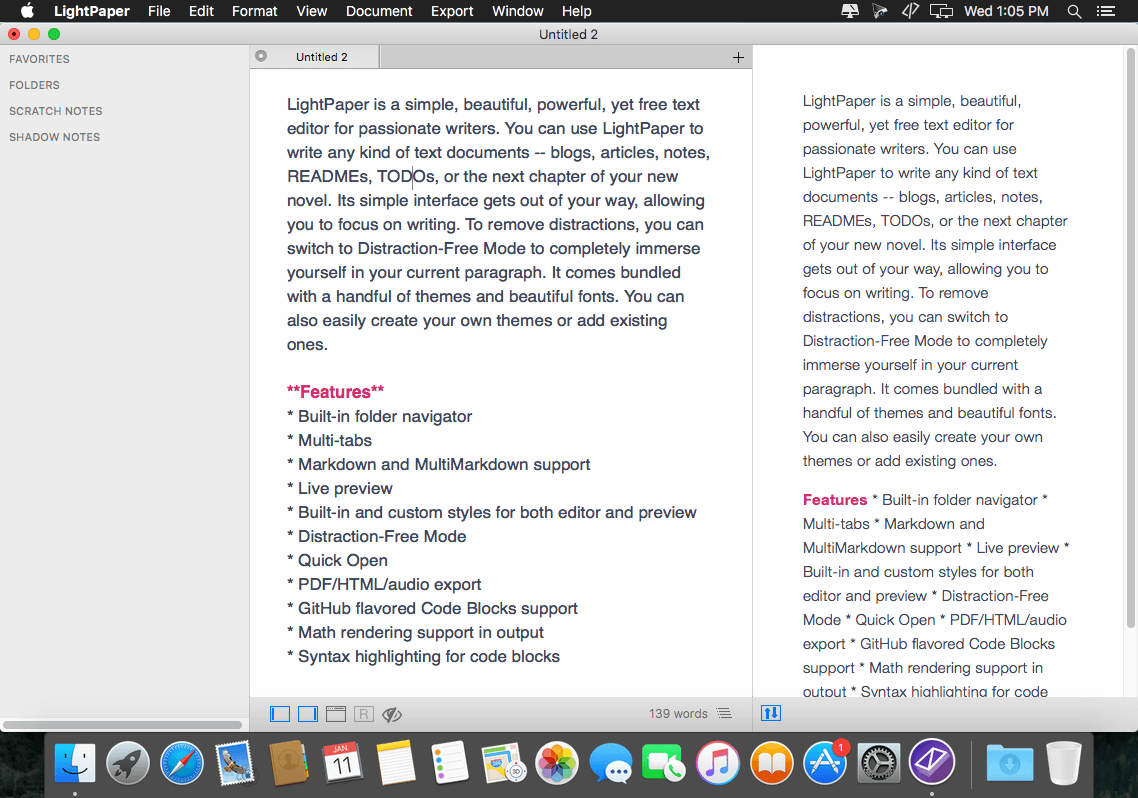
LightPaper is a simple, beautiful, powerful, yet free text editor for passionate writers. You can use LightPaper to write any kind of text documents -- blogs, articles, notes, READMEs, TODOs, or the next chapter of your new novel. Its simple interface gets out of your way, allowing you to focus on writing. To remove distractions, you can switch to Distraction-Free Mode to completely immerse yourself in your current paragraph. It comes bundled with a handful of themes and beautiful fonts. You can also easily create your own themes or add existing ones.
Features
- Built-in folder navigator
- Multi-tabs
- Markdown and MultiMarkdown support
- Live preview
- Built-in and custom styles for both editor and preview
- Distraction-Free Mode
- Quick Open
- PDF/HTML/audio export
- GitHub flavored Code Blocks support
- Math rendering support in output
- Syntax highlighting for code blocks
WHAT’S NEW
Version 1.4:
Features
- New unsaved files are restored automatically when closing the application without asking you to save first. If you close a tab, however, you'll be prompted to save it first if it is unsaved.
- Added a new syntax highlighting theme - Solarized.
- One click document open. Save yourself a click as you don't have to double click to open a document. Single click will temporarily open a document. To permanently open a document, double click like usual.
- One click folder toggle. A single click will expand/ collapse a folder in the navigator.
- LightPaper Mini - added a slider to change the width/height ratio of the mini popover window. This can be accessed from the preferences.
- You can now sort sidebar items (except Folders) using different options. Right-click on one of the FAVORITES, SCRATCH NOTES, SHADOW NOTES headers for Sorting Options.
- You can now use shortcuts to jump between editor and the sidebar. See View > Jump to Sidebar and View > Jump to Editor for available shortcuts.
- You can now use CMD+ENTER to open a sidebar item instead of using your mouse and double clicking it.
Improvements
- Added a "Close All Tabs" menu item
- A document's base URL is always set to its parent folder by default
- Editor outline now recognizes --- and === tags for headers as well
- Syntax highlight now supports more languages out of the box including SQL
- Scratch and Shadow notes are now restored as well when opening the app.
- Scratch and Shadow notes are automatically saved when closing the app.
- App will now remember your expanded folders from the previous session.
- Changed the placements of both editor outline and preview outline
- LightPaper now always remembers opened folder not just when restarting the app.
- Don't autobullet if ENTER is done at the beginning of the line
- When trying to open a folder, focus it instead if it is already opened
- LightPaper now remembers the order of files when restoring them.
Bug Fixes
- Fixed a bug where margin would set to 0 for some Mac Sierra users
- Fixed a bug where the app would crash on closing if there is at least one unsaved document
- Fixed navigator jumpiness when opening a document
- Fixed a bug where sometimes multiple copies of LightPaper mini would run
- Fixed a bug where distraction free mode would show a white border when using a dark theme
- Multiple copies of mini documents are opened instead of selecting the tab
- Remove fixed header font size from default LightPaper themes
- Clicking out of a pinned shadow note without hitting save doesn't save the note in some cases.
- CMD+3 closes the external window if it is already open
- CMD+S doesn't work for an untitled document
- LightPaper Mini doesn't start for some users
- Other few minor bugfixes
Screenshots
Frequently asked questions
How do I install the app?
Mount the image, drag the app into the "Applications" folder and launch it. If the system blocks the launch, allow it in "System Settings → Privacy & Security".
The app is damaged or won't launch
Reinstalling from a fresh image usually helps. Make sure your macOS version matches the one listed in the compatibility specs.
How do I update?
Download the new version from the site and install it over the current one — your settings will be preserved.
The download link doesn't work
Try a mirror or a download manager. For large files the browser often drops the connection.
How do I completely remove the app?
Use an uninstaller utility — it cleans up the service files that remain after moving the app to the trash.
VersionLightPaper 1.4
Developerlightpaper.42squares
CompatibilityOS X 10.9 or later, 64-bit processor
LanguageEnglish
IncludesPre-K'ed


Information
Visitors in the group Guests cannot leave comments on this publication.
Choose a download source
LightPaper 1.4 · 16.17 MB