Music Player for VK 3.0
Music Player is a must have music player to enjoy listening to millions of popular songs.
Awesome features:
- Beautiful design.
- Fast access to music of your friends, subscriptions, favored public pages and communities.
- Music news. All songs from one post could be added in one click to your music.
- Hot keys: Fn-F7 — previous song; Fn-F8 — play / pause; Fn-F9 — next song.
- Last.fm scrobbling.
- Сache music and offline player mode.
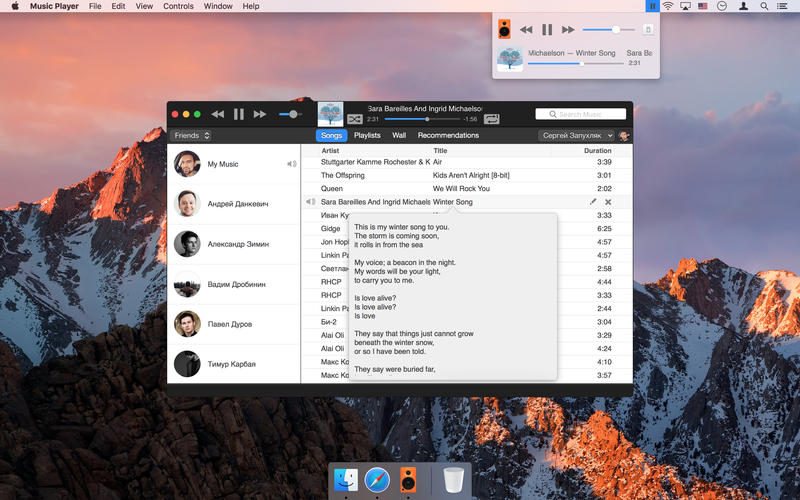
- Duplicate-free global search music result. Click on the artist name to search by Artist automatically. Click on the song to see lyrics.
- Change now the songs order by draging them and copy the titles to clipboard by Cmd+F.
- Recommendations, popular music, songs from walls.
- Manage your music: create your own playlists by adding songs from friends' collections. Edit your songs.
- Full-featured playlist editing. Formatting them is now much easier even then in the native web interface. Just drag any of your or your friend's songs to playlist to fill it.
- New MiniPlayer in Menu Bar.
- Now playing Notifications.
- Share now playing song on Twitter.
- Broadcast song title to your mood status.
- Full-screen view.
WHAT’S NEW
Version 3.0
- All New Design.
- Music Player now supports 2-step verification and uses HTTPS.
SCREENSHOTS
ATTENTION! For the correct work of the player you need to logout and login again or reinstall the app.
Frequently asked questions
How do I install the app?
Mount the image, drag the app into the "Applications" folder and launch it. If the system blocks the launch, allow it in "System Settings → Privacy & Security".
The app is damaged or won't launch
Reinstalling from a fresh image usually helps. Make sure your macOS version matches the one listed in the compatibility specs.
How do I update?
Download the new version from the site and install it over the current one — your settings will be preserved.
The download link doesn't work
Try a mirror or a download manager. For large files the browser often drops the connection.
How do I completely remove the app?
Use an uninstaller utility — it cleans up the service files that remain after moving the app to the trash.
VersionMusic Player for VK 3.0
DeveloperSergey Zapuhlyak
CompatibilityOS X 10.10 or later, 64-bit processor
LanguageEnglish, Russian
IncludesPre-K'ed





Information
Visitors in the group Guests cannot leave comments on this publication.
Choose a download source
Music Player for VK 3.0 · 3.69 MB