Exif Editor 1.1.9
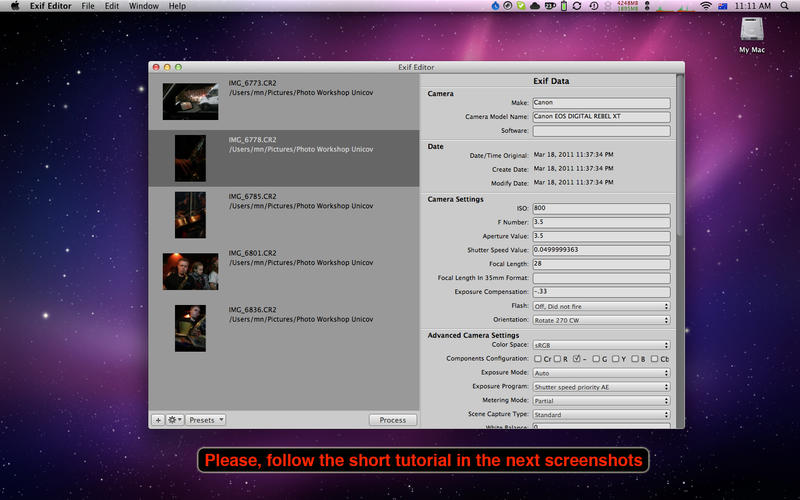
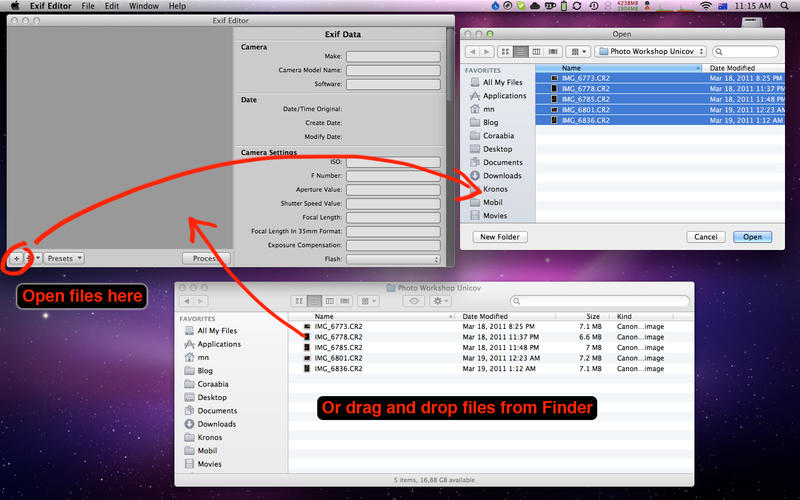
Exif Editor is an application that allows you to edit metadata in directly your photos.
The tool is useful when you don't want to expose camera to your customers. When your RAW processor doesn't open your file because it doesn't recognise valid camera/lens combination.
In some applications, it's needed to reload metadata as they are heavily cached, for example Adobe Bridge, Lightroom or Aperture.
- Adobe Lightroom - select image, right click and in the popup menu select Metadata->Read Metadata from Files
Exif Editor now support for the following file formats
- JPEG
- TIFF
- Canon CR2
- Nikon NEF
- Olympus ORF
- Adobe DNG
- Fuji RAF
- Panasonic RW2
- Pentax PEF
- Phase One IIQ
- SONY ARW
The following tags are supported.
- EXIF: Artist, Image Description, Copyright, Software, User Comment, Make, Model, Owner Name, Date/Time Original, Create Date, Modify Date, ISO, F Number, Aperture, Shutter Speed, Focal Length, Focal Length In 35mm Format, Exposure Compensation, Flash, Orientation, Color Space, Components Configuration, Exposure Mode, Exposure Program, Exposure Time, Metering Mode, Scene Capture Type, White Balance, Saturation, Sensing Method, Sharpness, Subject Distance Range, Lens Make (by exif standard, not by some makers standards), Lens (by exif standard, not by some makers standards), Lens Model (by exif standard, not by some makers standards), Canon specific Lens Type, Pentax specific Lens Type, Leica specific Lens Type, SONY specific Lens Type, XResolution, YResolution, ResolutionUnit
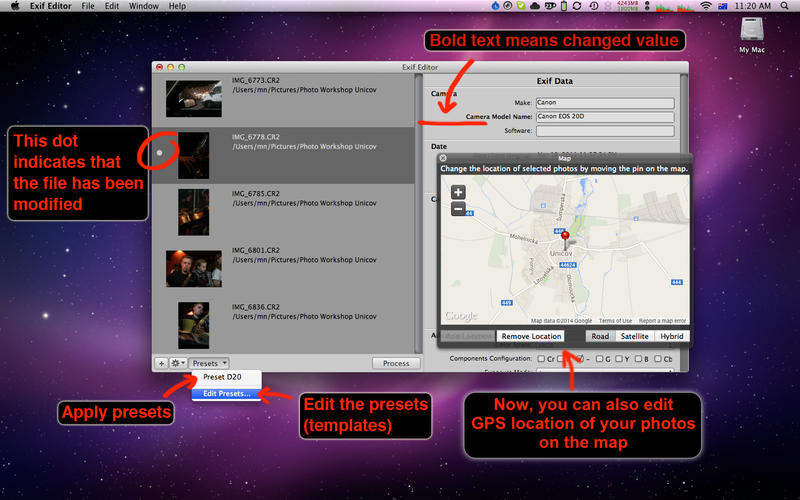
- GPS: Latitude, LatitudeRef, Longitude, LongitudeRef, Altitude, AltitudeRef, Img Direction, Img Direction Ref, DateStamp
- Canon Maker Note: Owner Name, Canon Model ID
- FUJI Maker Note: Film Mode, Dynamic Range Setting, White Balance, Shadow Tone, Highlight Tone
- Sigma RAW Maker Note: ISO
- IPTC: Author By-line, By-lineTitle, Copyright Notice, Contact, Headline, Caption-Abstract, Writer-Editor, Object Name, Category, Supplemental Categories, Date Created, Keywords, Sub-location, City, Province-State, Country-Primary Location Name, Country-Primary Location Code, Original Transmission Reference, SpecialInstructions, Credit, Source
- XMP: Serial number, Lens, Keywords, Create Date, Modify Date, Latitude, Latitude Ref, Longitude Ref, Longitude, Photoshop Date Created
- XMP Panorama: Use Panorama Viewer, Stitching Software, Projection Type Pose Heading Degrees, Full Pano Width Pixels, Full Pano Height Pixels, Projection Type, Cropped Area Left Pixels, Cropped Area Top Pixels, Cropped Area Image Width Pixels, Cropped Area Image Height Pixels, Source Photos Count
WHAT’S NEW
Version 1.1.9
- Bug fixes
- Added support for MOS files
- Upgraded exiftool
SCREENSHOTS
Frequently asked questions
How do I install the app?
Mount the image, drag the app into the "Applications" folder and launch it. If the system blocks the launch, allow it in "System Settings → Privacy & Security".
The app is damaged or won't launch
Reinstalling from a fresh image usually helps. Make sure your macOS version matches the one listed in the compatibility specs.
How do I update?
Download the new version from the site and install it over the current one — your settings will be preserved.
The download link doesn't work
Try a mirror or a download manager. For large files the browser often drops the connection.
How do I completely remove the app?
Use an uninstaller utility — it cleans up the service files that remain after moving the app to the trash.
VersionExif Editor 1.1.9
DeveloperMartin Novak
CompatibilityOS X 10.7 or later, 64-bit processor
LanguageEnglish
IncludesPre-K'ed


Information
Visitors in the group Guests cannot leave comments on this publication.
Choose a download source
Exif Editor 1.1.9 · 6.83 MB