Graphics for iWork 3.1.2
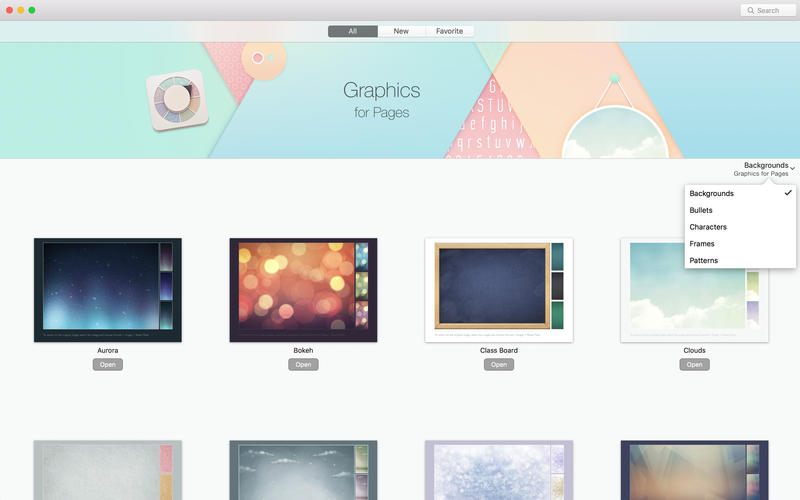
The Graphics for iWork set contains a generous selection of over 700 high-quality designs to help you create unique Pages or Keynote content. It is an excellent collection for adding some exclusivity to your documents with original bullets, characters, patterns, and image frames.
Graphics for iWork contains:
- 30 background sets for Pages and Keynote
- 46 bullet sets for Pages and Keynote
- 20 character sets for Pages and Keynote
- 91 frame sets for Pages and Keynote
- 67 pattern sets for Pages and Keynote
- 151 shapes for Pages and Keynote
All images include transparent backgrounds that allow placing them on various colors and patterned backgrounds. You can apply the elements to your documents by simply copying and pasting them or, if you are applying a pattern, copying and pasting the selected graphic style.
WHAT’S NEW
- New app icon;
- Minor bug fixes and performance improvements.
SCREENSHOTS


Frequently asked questions
How do I install the app?
Mount the image, drag the app into the "Applications" folder and launch it. If the system blocks the launch, allow it in "System Settings → Privacy & Security".
The app is damaged or won't launch
Reinstalling from a fresh image usually helps. Make sure your macOS version matches the one listed in the compatibility specs.
How do I update?
Download the new version from the site and install it over the current one — your settings will be preserved.
The download link doesn't work
Try a mirror or a download manager. For large files the browser often drops the connection.
How do I completely remove the app?
Use an uninstaller utility — it cleans up the service files that remain after moving the app to the trash.
VersionGraphics for iWork 3.1.2
DeveloperJumsoft
CompatibilityOS X 10.11 or later, 64-bit processor
LanguageEnglish, French, German, Italian, Japanese, Korean, Russian, Simplified Chinese, Spanish
IncludesPre-K'ed

Information
Visitors in the group Guests cannot leave comments on this publication.
Choose a download source
Graphics for iWork 3.1.2 · 1.58 GB