SecuritySpy 5.5.8
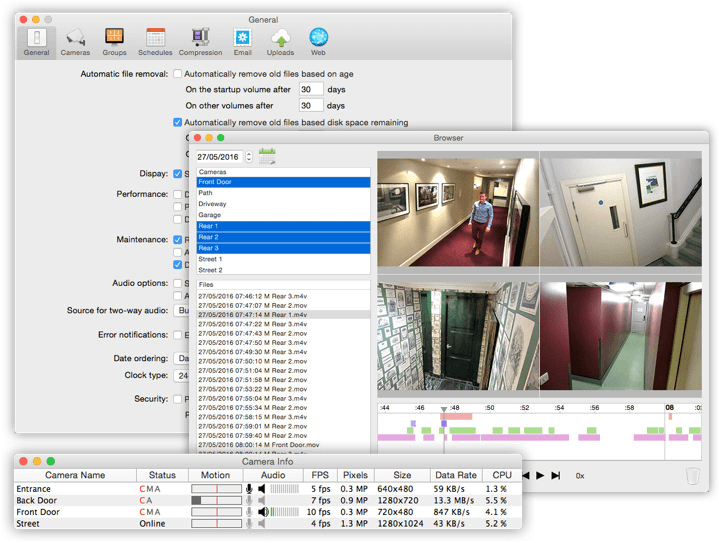
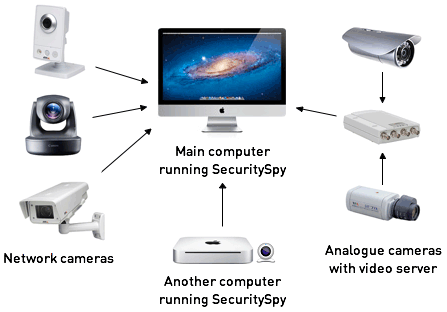
SecuritySpy will enable you to quickly set up an effective video surveillance (CCTV) system. If you plan to install the base home or a large professional system, SecuritySpy provides a reliable solution. SecuritySpy is working with a wide range of cameras to suit every need, from traditional analog cameras to the latest high-definition network camera, offering superior quality video at a resolution of megapixels.
SecuritySpy's flexibility and comprehensive list of features allows users to set up a system tailored to their individual needs. Whether it is a system with a single camera or many dozens, in a domestic or business environment, SecuritySpy is ideal.
Features
- Displays and captures live video from multiple cameras simultaneously
- Supports Mac-compatible video and audio input devices
- Supports network video devices (Axis, JVC, Panasonic, Pixord, D-Link, etc.)
- Motion detection and timelapse capture features, with audio
- Built-in Web server for remote viewing and administration
- Pan/Tilt/Zoom (PTZ) support for many network cameras
- Powerful real-time compression for efficient storage of captured footage
- FTP upload feature for off-site storage of captured footage
- Motion-triggered email notifications
- Pre-capture buffer to capture video before the time of motion
- Browser feature for playback of captured footage, with synchronised multi-camera playback
Version 5.5.8:
- Performance improvements
- User interface improvements
- Smoother live video display for cameras with high frame rates
- Improved automatic file deletion
- Bug fixes
Frequently asked questions
How do I install the app?
Mount the image, drag the app into the "Applications" folder and launch it. If the system blocks the launch, allow it in "System Settings → Privacy & Security".
The app is damaged or won't launch
Reinstalling from a fresh image usually helps. Make sure your macOS version matches the one listed in the compatibility specs.
How do I update?
Download the new version from the site and install it over the current one — your settings will be preserved.
The download link doesn't work
Try a mirror or a download manager. For large files the browser often drops the connection.
How do I completely remove the app?
Use an uninstaller utility — it cleans up the service files that remain after moving the app to the trash.





Choose a download source
SecuritySpy 5.5.8 · 103.33 MB
Previous versions
SecuritySpy 5.5.8
Previous versions are available to registered users.
Comments 1