
liquivid Video Improve 2.8.3
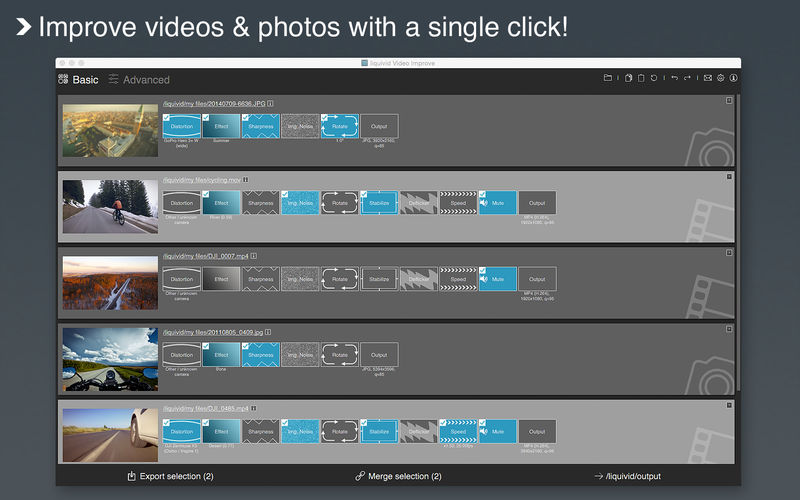
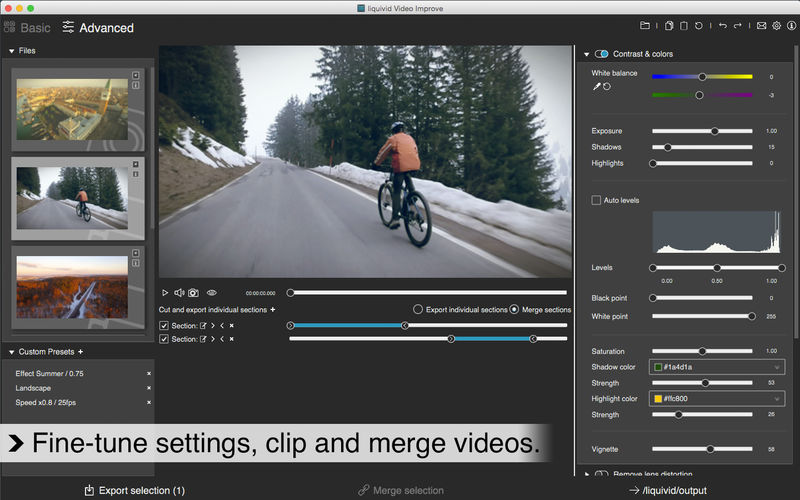

Liquivid is an intuitive, easy-to-use editor for your videos and photos: Clean up and improve all your captures with a single click & have more fun viewing and sharing your memories.
liquivid offers many appealing visual effects, fixes lens distortion caused by wide angle lenses (as in most actioncams), removes camera shake & image noise and improves colors and sharpness. Basic video cutting, batch processing and support for all common video formats, codecs and resolutions make it the tool of choice for everyone who wants to get more out of their captures.
Detailed Feature Overview:
- Visual effects, 14 to choose from
- Stabilization / camera shake removal
- Defishing / lens distortion removal. Built-in profiles currently include: GoPro Hero 3, Hero 3+, Hero 4 & Hero Session, Sony HDR-AS100V, Drift HD Ghost, SJCAM SJ4000 & SJ 5000, DJI Phantom 3, Garmin VIRB, Parrot Bebop 2, Rollei 6S, Rollei 410, Zoom Q8. Mobius ActionCam (lenses A, C2).
- Denoising
- Adjusting colors and contrast
- Sharpening
- Rotating & ropping
- Changing video play speed
- Video deflickering
- Video cutting
Supported Formats:
Input:
Photos: JPG, PNG, TIFF
Videos: all common formats and codecs in any resolution (including HD, 2K, 2.7K, 4K)
Output:
Photos: JPG, PNG
Videos: MP4 (h264), WMV, uncompressed AVI in any resolution (including HD, 2K, 2.7K, 4K) and with high bitrates
Version 2.8.3
- Bugfixes
Frequently asked questions
How do I install the app?
Mount the image, drag the app into the "Applications" folder and launch it. If the system blocks the launch, allow it in "System Settings → Privacy & Security".
The app is damaged or won't launch
Reinstalling from a fresh image usually helps. Make sure your macOS version matches the one listed in the compatibility specs.
How do I update?
Download the new version from the site and install it over the current one — your settings will be preserved.
The download link doesn't work
Try a mirror or a download manager. For large files the browser often drops the connection.
How do I completely remove the app?
Use an uninstaller utility — it cleans up the service files that remain after moving the app to the trash.
Versionliquivid Video Improve 2.8.3
DeveloperRazvan Chisu
CompatibilityOS X 10.9 or later, 64-bit processor
LanguageMultilangual
IncludesK'ed by TNT





Information
Visitors in the group Guests cannot leave comments on this publication.
Choose a download source
liquivid Video Improve 2.8.3 · 115.05 MB
Previous versions
liquivid Video Improve 2.8.3
Previous versions are available to registered users.