Desktop Stickers 2.97
Replace negative thoughts with positive self-talk stickers daily.
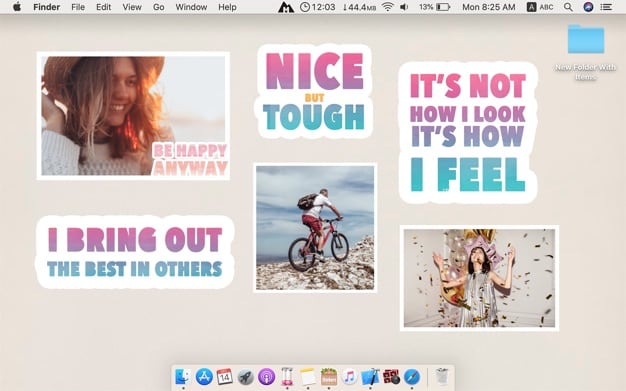


Your inner dialogue shapes how you feel. Desktop Stickers 2 keeps positive self-talk in view every day, so encouraging words replace negative ones and stay part of your daily routine.
- Ready-made affirmation stickers — swap negative self-talk (like "I'm overweight") for positive versions ("I am strong, I am capable") without writing your own.
- Stickers live on your desktop — pin them where you'll see them daily, so the habit builds itself instead of relying on willpower.
- Say them out loud — repeating the words daily reinforces self-esteem and supports overall well-being, the way self-talk is shown to help athletes perform.
- Add your own photo stickers — put happy memories and good moments on your desktop alongside your affirmations.
- Simple 3-step setup — select a sticker, click Done, and it's added to your desktop right away.
Version 2.97
- N E W C O O L S T I C K E R S !!
Frequently asked questions
How do I install the app?
Mount the image, drag the app into the "Applications" folder and launch it. If the system blocks the launch, allow it in "System Settings → Privacy & Security".
The app is damaged or won't launch
Reinstalling from a fresh image usually helps. Make sure your macOS version matches the one listed in the compatibility specs.
How do I update?
Download the new version from the site and install it over the current one — your settings will be preserved.
The download link doesn't work
Try a mirror or a download manager. For large files the browser often drops the connection.
How do I completely remove the app?
Use an uninstaller utility — it cleans up the service files that remain after moving the app to the trash.
Related posts
-
 Positive Grid BIAS FX Pro (with working ToneCloud) v1.6.2.3448
Mac Apps1.51 GB
Positive Grid BIAS FX Pro (with working ToneCloud) v1.6.2.3448
Mac Apps1.51 GB
-
 Positive Grid BIAS AMP 2 Elite (with working ToneCloud) v2.1.2.1163
Music & Audio552.61 MB
Positive Grid BIAS AMP 2 Elite (with working ToneCloud) v2.1.2.1163
Music & Audio552.61 MB
-
 Sketch Design - Color Pencil v3.1
Graphic Design7.55 MB
Sketch Design - Color Pencil v3.1
Graphic Design7.55 MB
-
 Oh! My Mind Mapping 2 PRO 6.2.1 (1.2.1)
Productivity13.55 MB
Oh! My Mind Mapping 2 PRO 6.2.1 (1.2.1)
Productivity13.55 MB
-
 Vitamin-R 2 2.58
Utilities63.5 MB
Vitamin-R 2 2.58
Utilities63.5 MB
Choose a download source
Desktop Stickers 2.97 · 141.83 MB
Previous versions
Desktop Stickers 2.97
Previous versions are available to registered users.