
Photos Exif Editor 5.1
Batch EXIF editor for Mac: edit IPTC, XMP and GPS


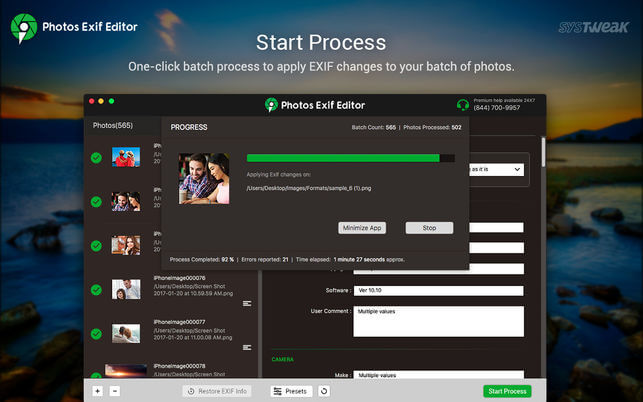
Photos EXIF Editor lets you view, edit and remove EXIF, GPS, IPTC and XMP metadata for thousands of photos at once, quickly and safely.
Fix wrong dates, add copyright and author info, update locations or strip private data before sharing. All in a few clicks, for one photo or an entire library.
Edit every kind of metadata
Read and write EXIF, GPS, IPTC and XMP fields, from camera settings and capture dates to keywords, captions and copyright.
Batch processing
Apply changes to a whole selection of photos in one go instead of editing files one by one.
Remove metadata for privacy
Delete individual tags or wipe metadata from an entire batch, including GPS location, before you post or send your photos.
Correct file dates
Set a file's modification and original date to match the date stored in its EXIF data, so your photos sort correctly everywhere.
Presets for repetitive work
Save frequently used metadata, such as your name, copyright or studio info, as presets and apply it in a click.
Automatic backups
Photos EXIF Editor saves a backup of the original metadata before writing any changes, so you can always go back.
RAW support
Works with popular image formats as well as RAW files from major camera brands.
Supported formats (full read and write)
- Images: JPEG, JPG, PNG, TIFF, TIF, PSD, JP2 (JPEG 2000) ***
RAW:
- Canon: CR2
- Nikon: NEF, NRW ***
- Sony: SR2 **, SRF (Cyber-shot) **
- Pentax: PEF **, DNG **
- Leica: DNG
- Ricoh: DNG
- Leaf: MOS
- Hasselblad (Imacon): FFF
- Smartphone DNG: Nokia Lumia 1020, OnePlus One
*** The Date/Time Original tag can't be changed for this format.
** The Camera Model tag can't be changed for this format.
Supported tags
- EXIF: Artist, Image Description, Copyright, Software, User Comment, Camera Make, Camera Model, Owner Name, Serial Number, Date/Time Original, Creation Date, Modify Date, ISO, F-Number, Focal Length, Focal Length in 35mm Format, Flash, Orientation, Exposure Mode, Exposure Program, Exposure Time, Metering Mode, Scene Capture Type, White Balance, Saturation, Sensing Method, Sharpness, Subject Distance Range, Lens Make, Lens Model, Lens Serial Number
- GPS: Latitude, Latitude Ref, Longitude, Longitude Ref, Altitude, Altitude Ref
- IPTC: By-line (Author), By-line Title, Copyright Notice, Headline, Caption/Abstract, Writer/Editor, Object Name, Category, Supplemental Categories, Keywords, Sub-location, City, Province/State, Country Name, Country Code, Original Transmission Reference, Special Instructions, Credit, Source
- XMP: Serial Number, Lens, Create Date, Modify Date, Latitude, Longitude, Photoshop Date Created
Whether you're a photographer organizing a shoot, an archivist cataloging images or simply someone who wants their photo dates to make sense, Photos EXIF Editor gives you full control over your metadata.
Version 5.0
- Compatible with the latest macOS.
- Minor bug fixes and improvements.
Frequently asked questions
How do I install the app?
Mount the image, drag the app into the "Applications" folder and launch it. If the system blocks the launch, allow it in "System Settings → Privacy & Security".
The app is damaged or won't launch
Reinstalling from a fresh image usually helps. Make sure your macOS version matches the one listed in the compatibility specs.
How do I update?
Download the new version from the site and install it over the current one — your settings will be preserved.
The download link doesn't work
Try a mirror or a download manager. For large files the browser often drops the connection.
How do I completely remove the app?
Use an uninstaller utility — it cleans up the service files that remain after moving the app to the trash.

Choose a download source
Photos Exif Editor 5.1 · 12.3 MB
Previous versions
Photos Exif Editor 5.1
Previous versions are available to registered users.