
Omnifocus 2 v 2.14 (for iPhone)
Thank you for your interest in OmniFocus 2! We encourage anyone considering OmniFocus to purchase our universal app rather than this iPhone-only app. The universal app adds new features and is designed for all iOS devices: iPhone, iPad, and Apple Watch.
The universal app is the same price as this iPhone-only app, but it’s a better deal.
This app is still in the App Store so we can continue to offer updates to our existing customers, and so they can use Complete My Bundle to switch to the universal app without having to pay full price.
If you're a new customer considering OmniFocus, we encourage you to follow the Related Apps links to our universal OmniFocus 2 app (the one with a black checkmark on the icon, rather than this one with the white checkmark).
If you've been using OmniFocus 2 for iPhone and would like to start using OmniFocus on your Apple Watch or iPad, you can use Complete My Bundle with the OmniFocus Legacy Support Bundle to get full credit for your existing investment in OmniFocus. (If you previously purchased OmniFocus 2 for iPad, you don't even need to Complete My Bundle! Check your Purchased apps: the universal update is free.)
If you own this app and don’t need the universal app, you’ll still get major free updates: features such as Dark Mode, Swipe to Flag, and Push-Triggered Syncing are on the way. Stay tuned!
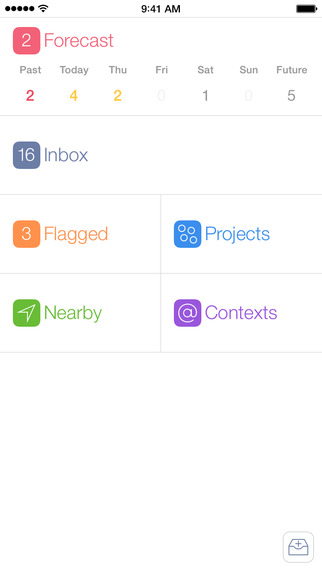
Screenshots
Frequently asked questions
How do I install the app?
Mount the image, drag the app into the "Applications" folder and launch it. If the system blocks the launch, allow it in "System Settings → Privacy & Security".
The app is damaged or won't launch
Reinstalling from a fresh image usually helps. Make sure your macOS version matches the one listed in the compatibility specs.
How do I update?
Download the new version from the site and install it over the current one — your settings will be preserved.
The download link doesn't work
Try a mirror or a download manager. For large files the browser often drops the connection.
How do I completely remove the app?
Use an uninstaller utility — it cleans up the service files that remain after moving the app to the trash.
VersionOmnifocus 2 v 2.14 (for iPhone)
DeveloperThe Omni Group
CompatibilityRequires iOS 9.0 or later. Compatible with iPhone, iPad, and iPod touch.
LanguageEnglish, Dutch, French, German, Italian, Japanese, Russian, Simplified Chinese, Spanish
IncludesPre-K'ed




Information
Visitors in the group Guests cannot leave comments on this publication.
Choose a download source
Omnifocus 2 v 2.14 (for iPhone) · 18.53 MB