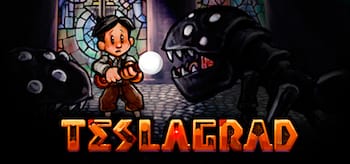
Teslagrad 1.0



A journey begins... A treacherous tower... Unravel its mysteries!
Discover the secrets kept in the long abandoned Tesla Tower!
Magnetism and other electromagnetic powers will help you explore a non-linear world of beautiful hand-drawn environments, in a steampunk-inspired vision of old Europe. A young boy suddenly finds himself embroiled in a long-forgotten conspiracy, involving a despotic king who rules the nation with an iron fist. Jump into an outstanding adventure told through voiceless storytelling, writing your own part. Armed with ancient Teslamancer technology and your own ingenuity and creativity, your path lies through the decrepit Tesla Tower and beyond.
Features
- Complex puzzles! Put your sense of logic to the test and cleverly manipulate the world around you using electricity and magnetism, the lifeblood of the game. Puzzles will range from “pff, that wasn't so bad” to keyboard-smashing, controller-chewing frustration.
- Explore! Make your way through rich 2D hand-drawn surroundings as you journey into — and beyond— Tesla Tower, picking up use amazing new items as you go.
- Visual storytelling! Tired of all those words in your video games? Have no fear, Teslagrad features not a single snippet of text or squeak of dialogue. Everything is purely visual, and the entire story is told through what you see (and sometimes what you don't see).
- Steampunk powered! Discover a dystopic and mind-blowing rainy-and-brainy setting, presenting a steampunk vision of an old Europe-inspired new world.
- Old-school boss fights! Use your skills and wits to overcome the 5 incredible final bosses eager to demagnetize you.
- No disruptions! That means no loading screens, no GUI, no cutscenes. Just the game and you.
Frequently asked questions
How do I install the app?
Mount the image, drag the app into the "Applications" folder and launch it. If the system blocks the launch, allow it in "System Settings → Privacy & Security".
The app is damaged or won't launch
Reinstalling from a fresh image usually helps. Make sure your macOS version matches the one listed in the compatibility specs.
How do I update?
Download the new version from the site and install it over the current one — your settings will be preserved.
The download link doesn't work
Try a mirror or a download manager. For large files the browser often drops the connection.
How do I completely remove the app?
Use an uninstaller utility — it cleans up the service files that remain after moving the app to the trash.





Choose a download source
Teslagrad 1.0 · 252.94 MB