3D Converter v6.5.11
The best 3D Video Converter with most 3D modes.
If you are 3D video lover, you shouldn't miss this 3D Video Converter.It can convert 2D Video to 3D Effect, 3D video to other 3D modes, 3D video to common 2D video easily and fast. It provides Anaglyph, Side by Side or Top/Bottom 3D modes for you to choose. With this powerful 3D Video Converter, users can easily enjoy the 3D effect with their 3D glasses and glasses-free 3D smartphones like HTC EVO 3D, Sharp SH-12C Aquos 3D, and LG Optimus 3D P920, and other compatible 3D display devices.
Key Features:
1.Convert 2D video to 3D
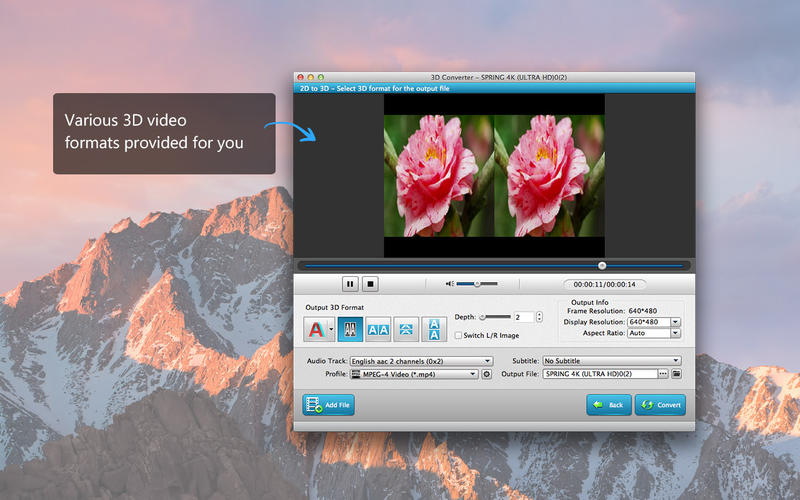
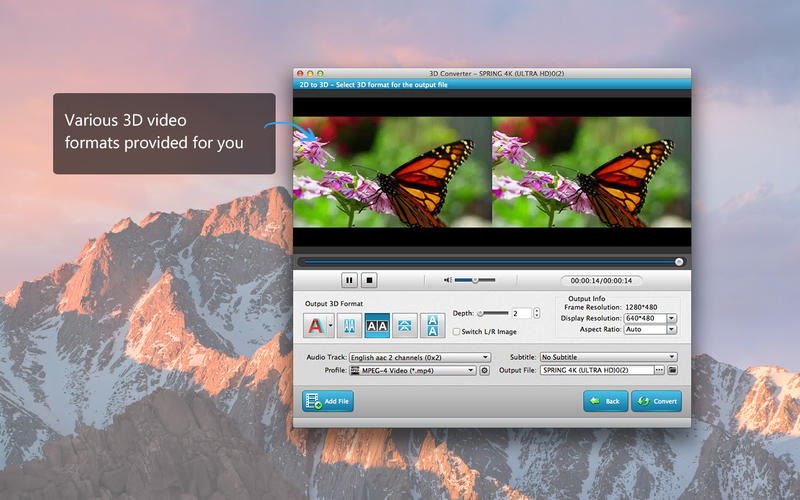
You can easily convert common 2D videos to 3D effect with this 2D to 3D Converter. You are provided several 3D Modes to choose: Anaglyph (ten types), Side by Side (Half-Width/Full), Top and Bottom (Half-Height/Full). The 2D to 3D conversion makes the video more vivid.
2.Convert 3D Video to Other 3D Modes
This powerful 3D Converter can help users to convert Side by Side (Half-Width/Full), Top and Bottom (Half-Height/Full) 3D video to other types of 3D videos like Anaglyph, Side By Side (Half-Width) 3D, Side By Side (Full) 3D, Top and Bottom (Half-Height) 3D, or Top and Bottom (Full), easily and fast.
3.Convert 3D Video to 2D
You can easily convert 3D videos, including Side By Side (Half-Width) 3D, Side By Side (Full) 3D, Top and Bottom (Half-Height) 3D, Top and Bottom (Full) 3D video to 2D video easily. You care allowed to select the left or right eye's image as the output video according to your preference and convert it to 2D video and watch them on TV, computer or other display devices.
Supported 3D Modes:
Anaglyph 3D (Red/cyan anaglyph, monochrome; Red/cyan anaglyph, half color; Red/cyan anaglyph, full color; Red/cyan anaglyph, high quality Dubois; Green/magenta anaglyph, monochrome; Green/magenta anaglyph, half color; Green/magenta anaglyph, full color; Amber/blue anaglyph, monochrome; Amber/blue anaglyph, half color; Amber/blue anaglyph, full color), Side by Side (Half-Width) 3D, Side by Side (Full) 3D, Top and Bottom (Half-Height) 3D and Top and Bottom (Full) 3D.
Supported Input Video Formats:
MPG, MPEG-1, MPEG-2, MPEG-4, DAT, MP4, WTV, DVR-MS, DivX, XviD, M4V, TS, MTS, M2TS, RM, RMVB, WMV, ASF, MKV, AVI, 3GP, 3G2, F4V, FLV, SWF, MPV, MOD, TOD, QT, MOV, DV, DIF, MJPG, MJPEG, TP, TRP, WebM, QuickTime HD MOV.
Supported Output Video Formats:
MPG, MPEG-1, MPEG-2, MPEG-4, H.264, H.264/MPEG-4 AVC, DivX, XviD, AVI, FLV, MP4, M4V, MKV, MOV, 3GP, 3G2, MTV, SWF, WMV, ASF, DPG, TS, DV, AMV, WebM, ASF.
Supported Devices:
- iPhone, iPad, iPod, Apple TV
- Android devices (Motorola Droid, Galaxy S, Galaxy Note, Galaxy Tab)
- Surface, Lumia and other Phones
- Archos, Creative ZEN, iRiver, Sansa, Sony Walkman
- Dell Player, General Pocket PC, HP iPAQ
- NDS, PS3, PSP, Wii, Xbox360
- Other popular mobile phones
WHAT’S NEW
Version 6.5.11
- More 3D setting choices
- Better output 3D images
SCREENSHOTS

Frequently asked questions
How do I install the app?
Mount the image, drag the app into the "Applications" folder and launch it. If the system blocks the launch, allow it in "System Settings → Privacy & Security".
The app is damaged or won't launch
Reinstalling from a fresh image usually helps. Make sure your macOS version matches the one listed in the compatibility specs.
How do I update?
Download the new version from the site and install it over the current one — your settings will be preserved.
The download link doesn't work
Try a mirror or a download manager. For large files the browser often drops the connection.
How do I completely remove the app?
Use an uninstaller utility — it cleans up the service files that remain after moving the app to the trash.
Version3D Converter v6.5.11
DeveloperRayShare Co., Ltd © Aiseesoft
CompatibilityOS X 10.5 or later, 64-bit processor
LanguageEnglish
IncludesK'ed by TNT

Information
Visitors in the group Guests cannot leave comments on this publication.
Choose a download source
3D Converter v6.5.11 · 46.05 MB