
MOV Converter Pro 6.5.19
Want to enjoy movies via QuickTime on your Mac? Try this MOV converter! You can convert MP4/WMV/FLV/AVI to MOV according to your need! Also, you are allowed to convert MOV to MP4/WMV/AVI/MP3/other video or audio formats.
Aiseesoft MOV Converter Pro can convert videos to and from MOV format conveniently. MOV Converter Pro can convert MOV to MP4, WMV, AVI, MPG and other video formats easily. Also, 4K videos are supported. It also helps you to convert MP4/WMV/AVI video to MOV for playing and editing in QuickTime, Final Cut Pro, etc.
Key Features:
- Convert MOV to MP4/AVI/WMV/4K video and MP3/WMA audio for convenient playback
This MOV converter is more than a MOV to MP4 converter. It is able to convert MOV videos to MP4, AVI, WMV, WEBM, 3GP, MP3 and other video/audio formats reversely. Also, 4K videos are supported. After converting, you can enjoy the videos on your iPhone, iPad, iPod, Samsung, HTC, LG phones and any other portable media player. - Convert MPG/WMV/AVI/MP4 to MOV
This MOV file converter helps you edit video files with iMovie, Final Cut Pro, Adobe Premiere and other professional video editing software, you need to convert your video files to MOV format first. MOV Converter Pro provides you a perfect way to do this. It can convert video in any format like WMV, AVI, MP4, FLV (including 4K) to MOV in one click. - Extract audio track from video files
MOV Converter Pro allows you to extract audio tracks from any video file and save them in popular audio formats losslessly, such as MP3/AAC/ALAC/other audio formats. - Various video editing features
It is designed with a built-in video editor which has some video editing functions. For example, you can adjust the brightness, hue, contrast, saturation of the video file, extract clips of the video, merge video clips into one and add watermark to the video. Also, you can rotate videos in 90 clockwise, 90 counterclockwise, horizontal flip, vertical flip.
WHAT’S NEW
Version 6.5.19
- Convert MOV to 4K videos
- Better to convert MOV to MP4, WMV, AVI, MP3
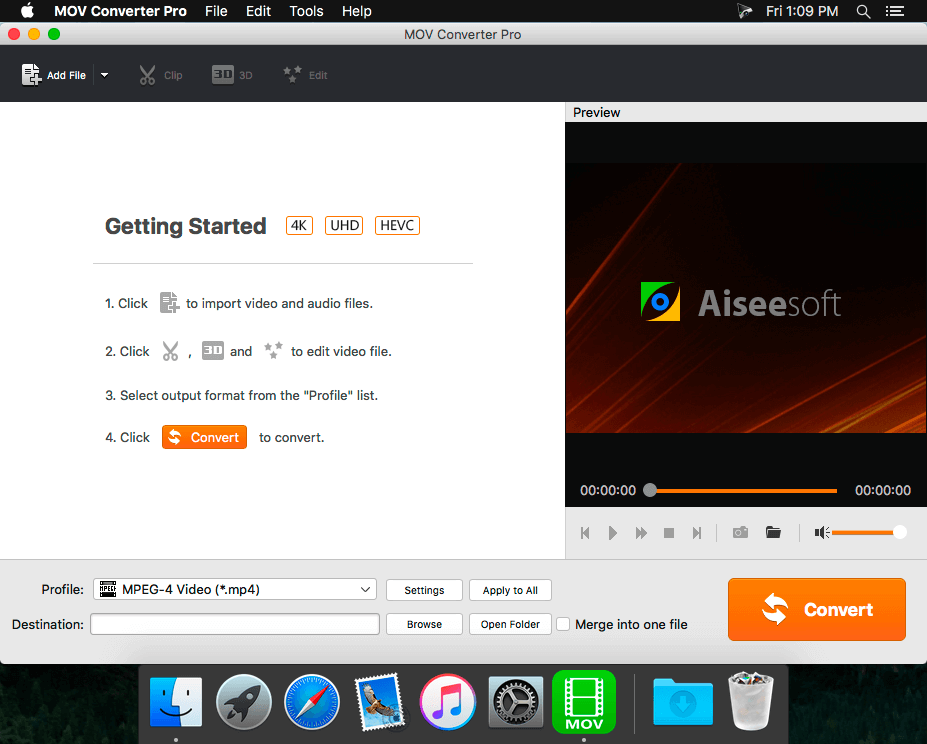
SCREENSHOTS
Frequently asked questions
How do I install the app?
Mount the image, drag the app into the "Applications" folder and launch it. If the system blocks the launch, allow it in "System Settings → Privacy & Security".
The app is damaged or won't launch
Reinstalling from a fresh image usually helps. Make sure your macOS version matches the one listed in the compatibility specs.
How do I update?
Download the new version from the site and install it over the current one — your settings will be preserved.
The download link doesn't work
Try a mirror or a download manager. For large files the browser often drops the connection.
How do I completely remove the app?
Use an uninstaller utility — it cleans up the service files that remain after moving the app to the trash.
VersionMOV Converter Pro 6.5.19
DeveloperRayShare Co., Ltd © 2016 Aiseesoft
CompatibilityOS X 10.5 or later, 64-bit processor
LanguageEnglish
IncludesPre-K'ed




Information
Visitors in the group Guests cannot leave comments on this publication.
Choose a download source
MOV Converter Pro 6.5.19 · 30.99 MB